 Windrush Solutions
Software and systems for trade businesses
We build and maintain Windrush BOS, the job software our own workshop runs on. We also help other businesses fix the admin that slows them down, from the first enquiry to the paid invoice.
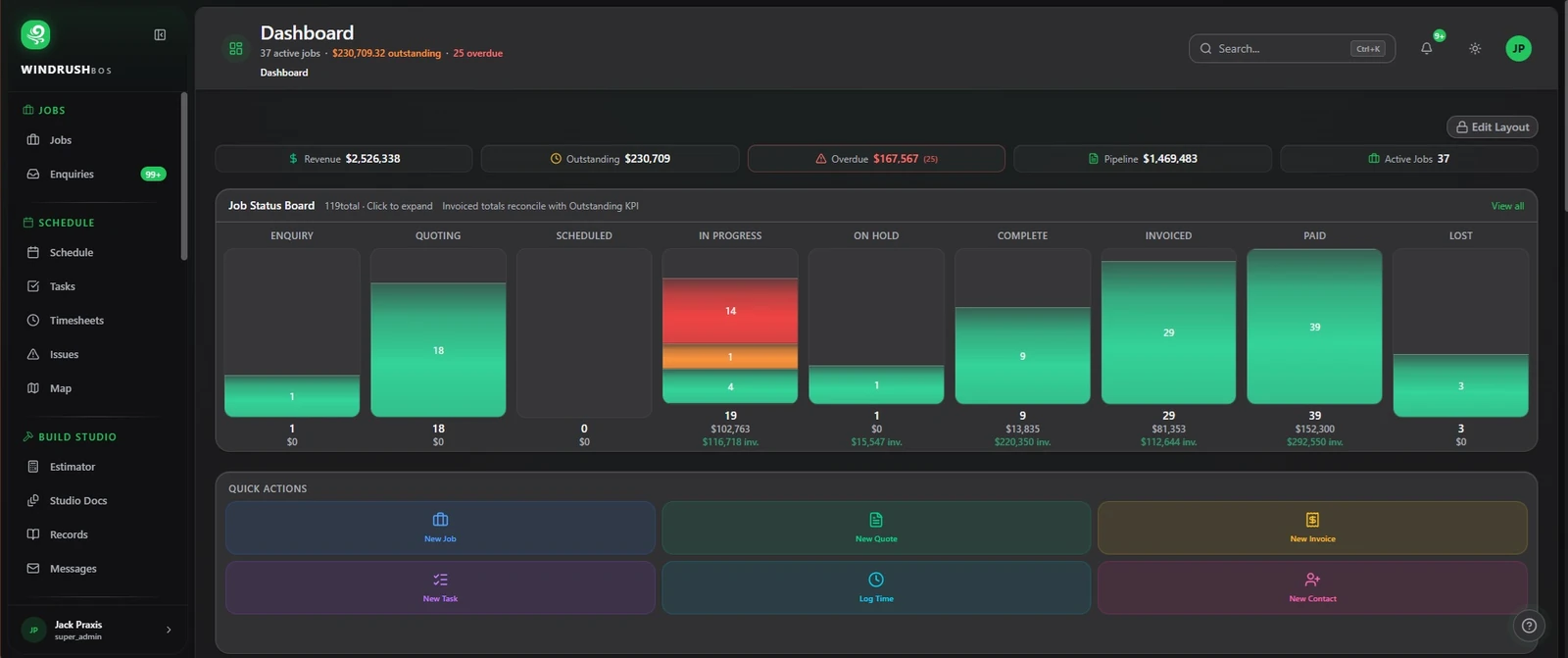
Systems, software and AI for your business
Admin automation
We take the repeat admin off your desk.
- Enquiries into quotes, quotes into jobs, jobs into invoices.
- Emails sorted and turned into tasks.
- Supplier bills and receipts read for you to check.
AI in your business
AI where it saves real time, not for show.
- Estimating help from drawings.
- Reading documents and contracts.
- Drafting quotes and paperwork.
Custom software
Internal tools when nothing off the shelf fits.
- Built around how your team already works.
- Linked to the systems you already use.
- Maintained by people who run a trade business.
Websites
Fast, simple sites that bring in work.
- We built and run this one.
- Enquiry forms that land where you work.
- Kept up to date as the business changes.
Connects with
- Xero
- Gmail
- Google Calendar
- Google Drive
- Stripe
- Excel / CSV
 Fergus
 simPRO
- MYOBComing soon
What Windrush BOS does
Everything here is in Windrush BOS today and runs our own workshop.
- Enquiry
- Quote
- Job
- Schedule
- Invoice
- Paid
Estimator
Upload a PDF drawing and work through it with the estimator, one drawing at a time.
- Sections, lengths and weights, then labour and price. You check every line.
- AS/NZS steel sections built in, from UB and UC to SHS, RHS, angle and plate.
- Turn the estimate into a quote or a job.
- Raise purchase orders from the estimate, split by supplier.
- AI credits pay for the drawing reading. Every plan includes some each month.
Quotes
Quotes that keep every version, carry the drawings and go out by email.
- Each revision is saved as a new version.
- Attach drawings and other files to the quote.
- Email the quote from Windrush BOS.
- The customer views and accepts it online.
Purchase orders
Order materials from the job and keep suppliers in line.
- Raise purchase orders from the estimate or the job.
- Split orders by supplier.
- Supplier quotes read into Windrush BOS for you to check.
- Costs flow back to the job.
Jobs and costs
Each job collects its costs as it runs, so you can see where it stands.
- Job cost from timesheets, purchase orders and supplier bills, with profit shown ex GST.
- Jobs move to In progress on their start date.
- Enquiry emails come in as enquiries with their attachments filed.
- Emails that need action become tasks, without duplicates.
- Contract summaries: payment terms, retention, insurance and risky clauses.
Schedule
Plan the week on a Gantt-style schedule and put the crew on jobs.
- Gantt-style view of jobs and their phases.
- Drag the crew onto jobs.
- Undo a move if you get it wrong.
- Shows when one person is booked on two jobs at once.
Timesheets and leave
The crew clocks on and off on their phone. The office approves the week.
- Clock on and off from the phone.
- Approve timesheets in the office.
- Export approved timesheets as CSV or PDF.
- Leave requests and balances.
Crew phone
The screens the crew uses on site.
- Clock on and off, today's jobs and tasks.
- Job photos.
- Variations and equipment.
- Their own schedule.
Safety
Safety paperwork the crew can read, sign and fill in on their phone.
- Build a SWMS for the job.
- The crew reads and signs the SWMS on their phone.
- Incident reports from the phone.
- A day diary for each job.
- Safety registers in the office.
Invoices and bills
Invoice from the quote or the job, and check supplier bills as they arrive.
- Invoice from the quote or the job.
- Progress claims and recurring invoices.
- A card payment link in the invoice email.
- Supplier bills that arrive by email are read into Windrush BOS for you to check.
- Photo a receipt on the phone and Windrush BOS reads it.
Customer portal
Your customers see their jobs, quotes and invoices in one place.
- A private link for each customer.
- Accept quotes online.
- See invoices and what's owing.
Accounting and imports
Links with your accounting software and brings your records across when you start.
- Two-way link with Xero.
- Checks that flag where Windrush BOS and your accounts don't match.
- Bring contacts across from Xero.
- Bring contacts and jobs across from Fergus or simPRO.
Reports
How the jobs and the crew are going.
- Job profit.
- Debtors: who owes you and for how long.
- Crew utilisation.
- Timesheet summary.
Why us
Most consultants have never quoted a balustrade or chased a late invoice. We do both every week, and the systems we set up for you are the ones we run ourselves.
How it starts
We start by looking at how a job moves through your business today, then fix the slowest step first.
Already use Windrush BOS? Open Windrush BOS (opens in a new tab)